

CINEMA
Movie lovers are very often forced to wait in long queues because this kind of activity is so popular.
Cinema is a mobile movie ticketing app which makes the process of booking and purchasing tickets more comfortable than ever before. Commuter purchases, submits or validate a ticket through a smartphone, paying for a virtual ticket with their mobile applications using either a bank card or a wallet.
This is a fictional project, done as a result of a ui/ux case study.
Duration: March- June 2022
Role: UX research, UI Design, Interaction Design.
I was involved in every aspect of the process from research to analysis and design.
Methods & Tools: Figma, Google forms, Pen and Paper
Qualitative interviews, Competitive Analysis, Site map, User testing, User persona, journey mapping, Problem Statement, User flow, Design System, Wireframing, Prototyping
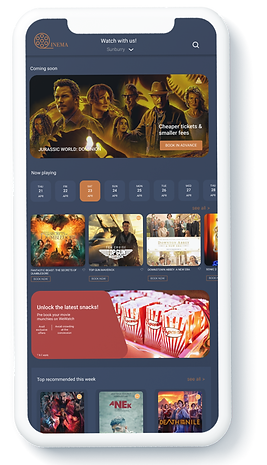
The Solution:
This design will help Cinema app work as a tool which makes the process of booking and purchasing tickets more comfortable than ever before.An app that allows user to easily book tickets online, place order for snacks in advance to avoid the long queues.
The Problem:
Cinema lovers are very often forced to wait in long queues because this kind of leisure is so popular.
CONTEXT
Cinema lovers sometimes have to stand in long queues to buy tickets for movies they want to watch. We’re creating an app to help cinema lovers to book their movie tickets in advance along with placing an order for munching snacks. It will affect users who come to watch in a group by letting them skip the in store order line and saving them time.
RESEARCH
The first step towards my project was to come up with my own experience with the movie ticketing process. After making few of my own assumptions, I started gathering the data. I interviewed friends and family members who are general movie fans, who love watching movies on big screen to get a broader perspective on their difficulties with the theatre experience. Then I researched and analysed the competitors in the market. This helped me create user personas to explore more about users major and minor pain points and gather insights on their behaviour.
I aimed to understand:
-
The reason why they would want to watch a movie in a theatre.
-
How many of them know what they want to watch.
-
Why they would need an app to book in advance.
-
Users with movie in mind, select few or nearest locations and then searches for a suitable time.
Pain points:
-
Users don’t want to stand in the long queue to buy tickets and socialise with people around.
-
To know the nearest cinema to their location.
-
To see which movies are available in a certain location.
-
To be able to order food in advance.
-
Sometimes there’s no space availability for groups.
-
Some users watch suggested or recommended movies.
-
Users have no clue about seat layout in the theatre and get confuse to choose.
User Personas
After finding a focus in the project, I used the insights to define our user personas.
These personas were really helpful to understand our users’ motivations and frustrations in their path to watch a movie in theatre.
-
Casie- A 27 years old History teacher who works Monday to Friday and sometimes on Saturdays. Casie loves watching movies with her group of friends and parents. She likes watching recommended movies or the ones with good reviews. Sometimes she finds it difficult to stand in queue for the tickets, sometimes she is confused about the movie she wants to watch. Sometimes she faces delays in the show due to group tickets. She wants to be on time, and not be stressful about her experience in the theatre.
-
Alex- A 35 year old Business operation manager who lives with his wife and three children. Alex and his wife always enjoyed watching movies together in the theatre and now when they have extended their family, they make sure to take their kids along with them. Even with his time bound schedule he makes sure to watch latest movies with his family. It is important for Alex to know which movies he can watch with his kids who are 8,7 and 4 years old. For a family of 5, Alex is the one to take care of tickets and the snacks in between the movie.

User Persona 1

User Persona 2
User journey Map
However I wanted to explore deeper and pin point where they struggle the most. So I mapped their journeys from their initial step till the end of their experience. This exercise enabled me to see clearly where I could help our persona have a better experience: the moment they start searching for movies until they step inside the theatre.

User journey map of a user going to the movie.
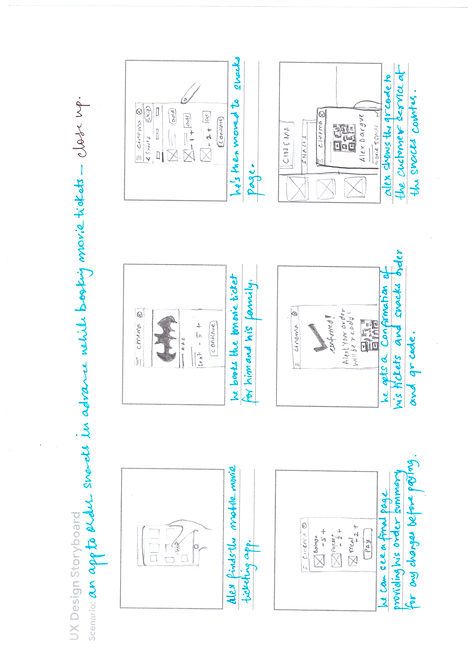
Story Boarding
By using Storyboarding, I outlined the context in which the app may be used by the users.
I created Big picture and Close up storyboards.

User flow
Once I had a clear vision for what we should build, I drafted my user flow. It gave me a big picture of my contents in a clear and concise way and guided me to ideation process.
The user flow shows the two types of journey a user can have for booking movie tickets. The users who know what to watch and where to watch can easily search their movies.
And the users who don’t know what to watch and where to watch can choose movies which are played in their nearest cinemas at their preferred time and date.


IDEATION
Paper Wireframes
From all knowledge collected from the process so far I began sketching paper wireframes, it was necessary for me to sketch out the ideas for the movie ticket booking flow. I made sure to base screen designs on feedback and findings from the user research.I started creating variations of the screens required, then chose the best parts of each variation and composed them into one single screens. The paper prototype consisted of the Home Screen, Movie page, Time and Seats page etc. After I had the main screens of the flow ready, I designed low fidelity wireframes on Figma.

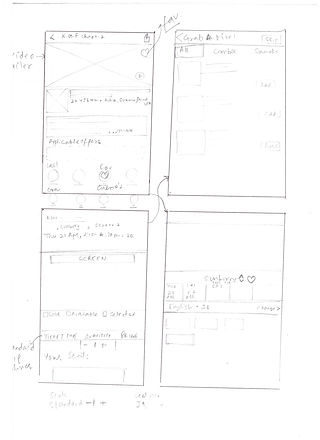
Stars were used to mark the elements of each sketch that would be used in the initial digital wireframes.
Digital Wireframes/ Low- Fidelity Prototypes
Taking the time to draft iterations of each screen of the app on paper ensured that the elements that made it to digital wireframes would be well suited to address user pain points. I created low fidelity designs to represent the skeletal framework of the app mainly by using shapes that represent interactions. This helped me visualise what the app will look like.
This flow presents the ideal steps a user will take to complete a journey of booking a ticket.
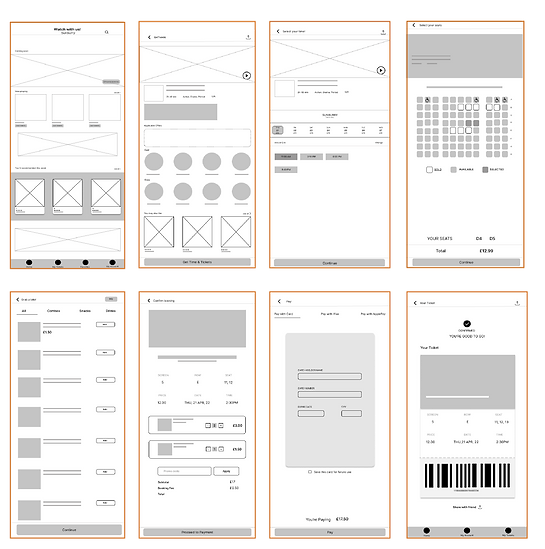
Digital Wireframes designed in Figma
USABILITY STUDY
After finishing low fidelity prototype of ticket booking’s main flow, I conducted a moderated usability study to test it with users. The Goal of this usability study was to see whether it addresses user pain points and makes a smooth experience for the user.
In the usability study I asked users to complete few tasks using the low fidelity prototypes.
I performed this study with 4 users, aged 21-50 - frequent and occasional viewers.
Users were asked to test out the low fidelity on their laptops while sharing their screens on Google meet. The users were instructed to perform tasks on the prototype while sharing and vocalising their emotions or frustrations. After each and every task they were given prompt follow up for a clear feedback.
Testing results & Solutions:
-
Users wanted to save Movies they plan on watching later, they wanted a quick access to their list for an easy booking procedure.
The solution: to give an option of ‘favourites’ to add movies as well as locations. Users can save their favourite cinema locations
-
Some users realised that they don’t really remember the layout of their seats after confirming the booking.
The solution: to add the seat layout on the confirmation ticket page, which has easy user access.
-
Users wanted to have a way by which they can choose a movie by their preferred date and time on the homepage.
The solution: to have a visually visible element on homepage which catches user; eye and lets user book movie tickets on the basis of their own suitable date and time.
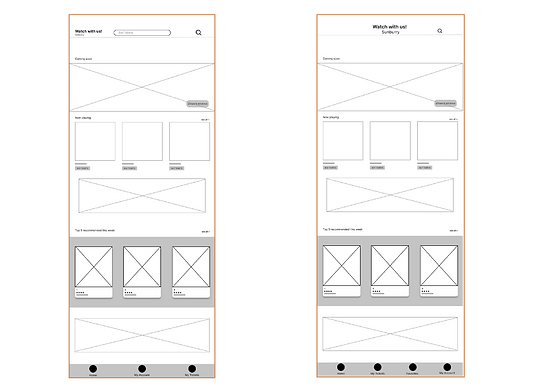
BEFORE
AFTER
to give an option of ‘favourites’ to add movies as well as locations. Users can save their favourite cinema locations
1
2
to have a visually visible element of 'date & time'on homepage which catches user; eye and lets user book movie tickets on the basis of their own suitable date and time.
BEFORE
AFTER

3
to add the 'seat layout' on the confirmation ticket page, which has easy user access.

BEFORE
AFTER
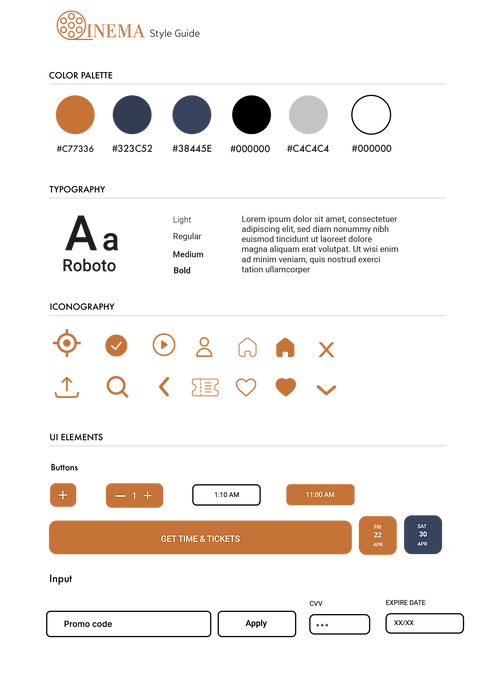
HIGH FIDELITY
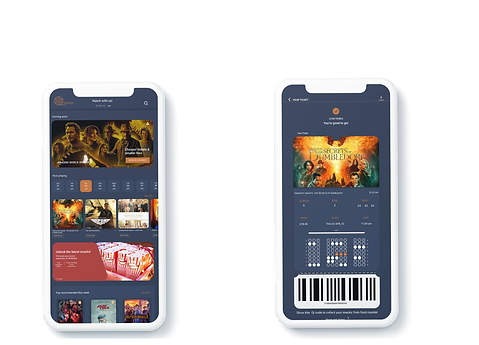
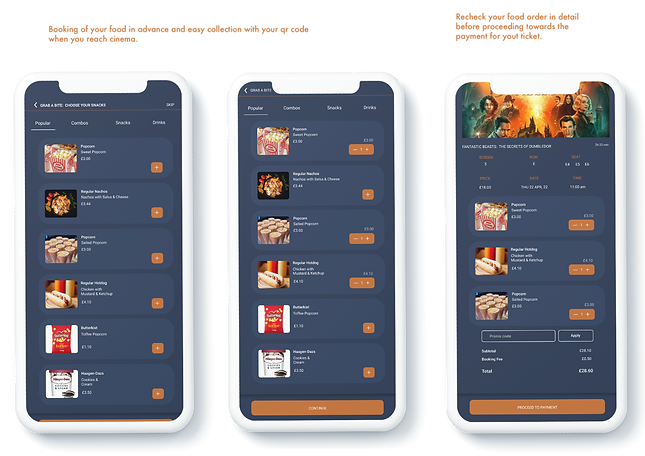
In final prototypes, I made sure to implement the feedback from the users. The colour combination picked up from mood-board gave a strong visual identity to Cinema app. Making it different from others.


ACCESSIBILITY
-
Sequential heading structure
-
Consistent navigation
-
Short summary of movies for better understanding of what the movie is about
-
Used labels

TAKEAWAY
This project has not only helped me understand user needs but it has also helped me improve my design skills.
I am glad that get to choose this topic, something
-
Drafting a research plan makes the research process easier and organised.
-
Understanding users' pain points and needs are an essential part of any products' success.
-
Considering to think from a different and fresh perspective can help discover new insights.
Thank you for reading.